
Invoice OCR for Google Sheets
Choose the fields once: supplier, invoice number, VAT, total, every line item. AI Snip fills them from each invoice you add, digital or scanned, with every value linked back to the page it came from.
100 free credits every month · no card required
OCR reads the text. You need the fields.
Plain OCR turns an invoice into a block of text. You still have to work out which number is the net amount, which is the VAT and which is the total, then type each one into the right column. Template-based tools go further, but they need a layout set up per supplier, and they break when a supplier redesigns its invoice.
Sheetminer does invoice data extraction inside Google Sheets. AI Snip reads each invoice against the fields you defined, by meaning rather than position, and writes the values straight into your columns. There is no upload portal, no export file and no copy-paste, so the invoice data lands in the spreadsheet where the coding, approval or reconciliation already happens.
From PDF invoice to spreadsheet in three steps
- 1
Add your invoices
Open Sheetminer in your Google Sheet and add invoices from Google Drive, a shared drive, or straight from your device. Add one, or a month of supplier invoices at once.
- 2
Choose the fields
Open AI Snip and describe the fields you need in plain English, such as: "For each invoice or receipt: supplier, date, tax and total, with English field names. No line items." Sheetminer turns that into template fields. You can also start from the built-in Invoice template. Setting up fields is free, and the template saves automatically.
- 3
Run it and insert
Run the template across every invoice you added and check each value against its highlighted spot on the page. Preview the table, then insert: one row per invoice or receipt (or one per line item, if you asked for them), each value linked back to where it was read.
Want the full walkthrough? Read how to extract invoice data from PDFs into Google Sheets.
Every value traces back to the invoice
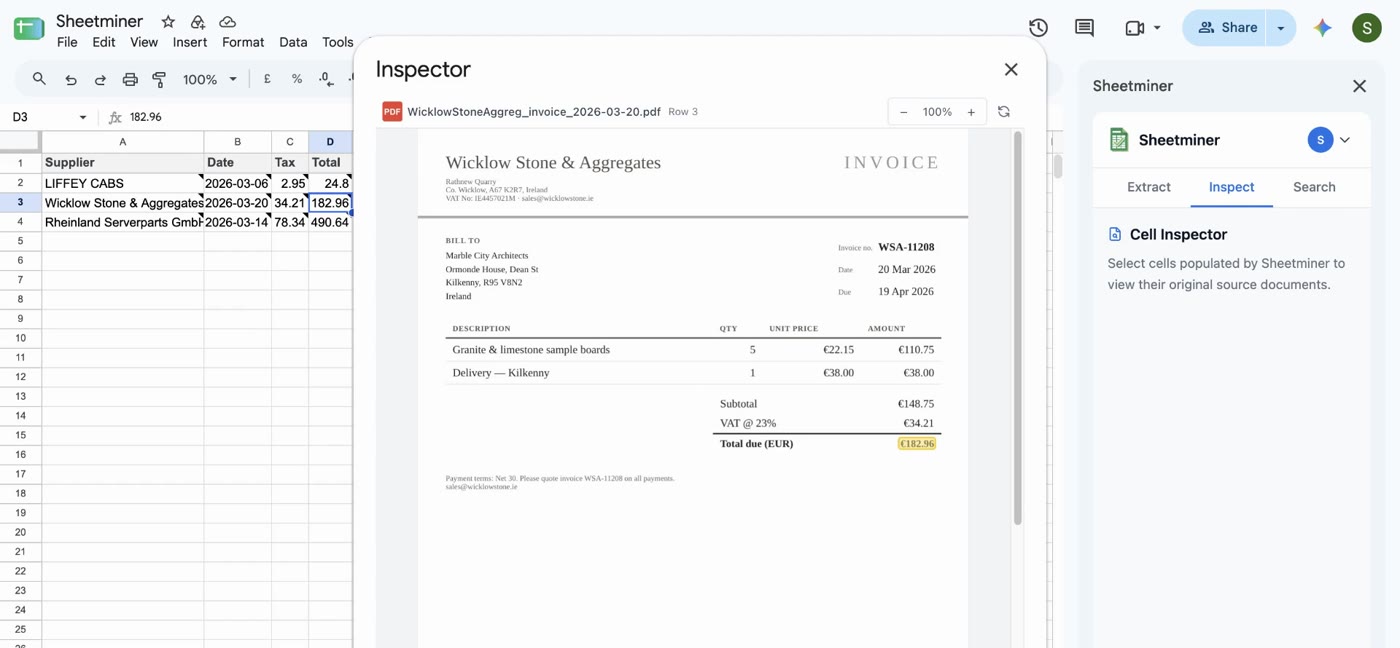
A typed-in total has no memory of where it came from. In Sheetminer, select any cell and open Inspect to see the original invoice, with the exact spot the value was read from highlighted.
When a VAT figure or a line total is questioned at month end, by a client, a reviewer or an auditor, the answer is one click away rather than a hunt through a Drive folder. More on that in building an invoice audit trail in Google Sheets.
Works with invoices from any supplier
There are no per-supplier layouts to build. Your template describes the fields, so a new supplier works the same way as the ones you process every month.
- PDF invoices
- Digital PDFs from suppliers, or scanned paper invoices.
- Images
- PNG and JPG, including phone photos of invoices and receipts.
- Multi-page
- Up to 50 pages and 20MB per invoice, with line items across pages.
- Languages
- English, Spanish, French, German, Dutch, Italian and Portuguese, read as-is.
Full limits in Supported Documents & Languages.
Data & Security
What happens to your documents, and what Sheetminer can actually see. Full detail in our Privacy Policy.
Instant processing
Extractions complete in seconds, with results delivered straight into your spreadsheet cells.
Industry-standard encryption
Data is encrypted and hosted on Google Cloud Platform in the EU/EEA. Sheetminer Limited is a registered Irish company and complies with GDPR.
Limited permission scope
Sheetminer only accesses the specific files you select and the spreadsheet you currently have open, not your entire Google Drive.
Frequently asked questions
Is there a free invoice OCR tool for Google Sheets?
Yes. Every Sheetminer account gets 100 free credits a month with no card required. Processing an invoice costs 2 credits per page, and each AI Snip run costs 1 credit per 2 pages (minimum 1), so a single-page invoice costs 3 credits. That covers around 30 single-page invoices a month. Building or editing fields is free.
What invoice data can it extract?
The built-in Invoice template covers supplier name and tax ID, invoice number, invoice and due dates, PO number, currency, net, tax and total amounts, plus a line items list with description, quantity, unit price, tax rate and line total. You can add, remove or rename any field, or describe your own, such as a cost centre or a project code.
Does it work with invoices from different suppliers?
Yes. AI Snip fields describe what to find, such as "the invoice total including VAT", not where it sits on the page. One template reads invoices from different suppliers without drawing zones or setting up a layout per supplier.
Does it work on scanned or photographed invoices?
Yes. Scanned PDFs and JPG or PNG photos are read with OCR in the same way as digital PDFs. Accuracy depends on image quality, so on a poor scan use the review step to check each highlighted value before it goes into the sheet.
Can I export the invoice data to Excel?
Yes. Once the invoice data is in Google Sheets, use File > Download to save it as an Excel (.xlsx) or CSV file for accounting software or anyone who works in Excel.
Is my invoice data secure?
Sheetminer only accesses the files you select and the spreadsheet you have open, not your whole Drive. Your original invoice is never modified, and one picked from Google Drive stays where it is. Sheetminer keeps an encrypted copy on Google Cloud Platform in the EU so it can show you the source in Inspect, and deletes it when you delete the document or your account.
Stop retyping invoices.
Install Sheetminer from the Google Workspace Marketplace and extract your first invoices today. 100 free credits a month, no card required.
Install for free